The Great Keyboard Debate: QWERTY vs AZERTY Explained
Différence entre QWERTY et AZERTY
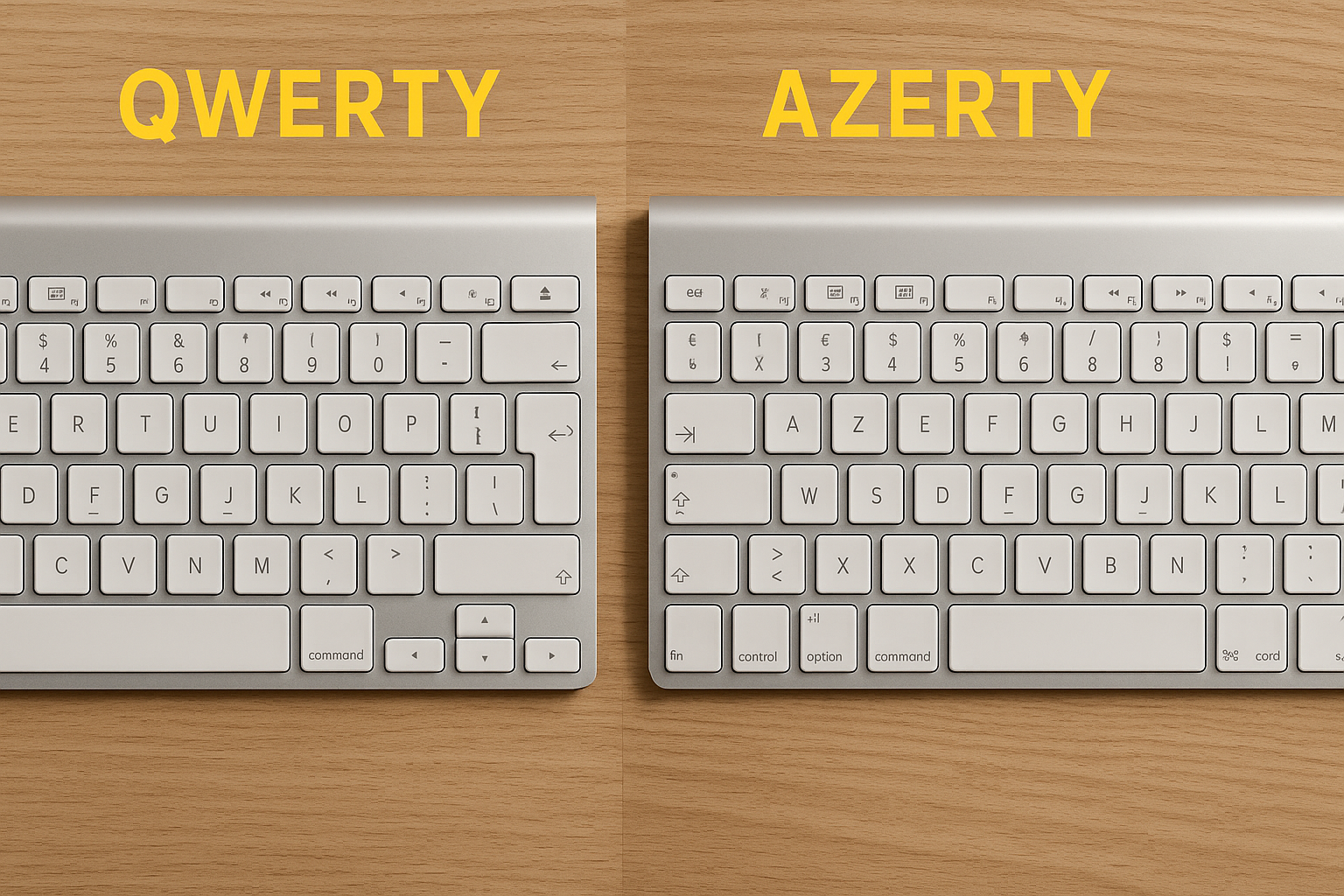
Souhaitez-vous comprendre la différence entre les disposition de clavier QWERTY et AZERTY ? Le QWERTY est la disposition standard utilisée dans la plupart des pays anglophones, tandis que l'AZERTY est couramment utilisé dans les pays francophones tels que la France, la Belgique et la Suisse. La principale différence réside dans l'agencement des lettres sur le clavier. Alors que le QWERTY dispose des six premières lettres sur la rangée supérieure "Q-W-E-R-T-Y", l'AZERTY suit l'agencement "A-Z-E-R-T-Y". Découvrez-en davantage sur ces différences de disposition de clavier et trouvez des produits qui correspondent à votre préférence. Visitez notre page pour les ordinateurs portables et trouvez l'appareil parfait pour vos besoins !Here’s an overview:
- Introduction to Keyboard Layouts
- Historical Evolution of QWerty
- Understanding the AZERTY Layout
- Ergonomics and Typing Efficiency: A Comparative Analysis
- The Geographic Divide: Regional Preferences and Adaptations
- Learning Curve and User Adaptability
- The Impact on Language and Character Accessibility
- [QWERTY’s linguistic influence](#qwerty’s-linguistic-influence)
- AZERTY and Francophone Adaptability
- Advocates and Critics: The Ongoing Debate
- Technological Adaptations: Smartphones and Touchscreens
- The Future of Typing: Are QWERTY and AZERTY Becoming Obsolete?
- Conclusion: Choosing the Right Keyboard for You
Introduction to Keyboard Layouts
Keyboard layouts are the specific arrangements of keys on a computer keyboard designed to increase typing efficiency and comfort. From their inception, keyboards have evolved to accommodate different languages, typing habits, and ergonomic requirements. The most dominant layout historically and globally has been the QWERTY design, named after the first six letters in the top row of alphabetic characters on the keyboard. Developed in the 1870s by Christopher Latham Sholes, the QWERTY layout was engineered to reduce the frequency of mechanical jams in early typewriters by spacing commonly used letter combinations apart.
Another well-known layout is the AZERTY, primarily used in French-speaking countries. It is named similarly after its own top row of letters. AZERTY adapts QWERTY to better suit the frequency and patterns of the French language, such as by making it easier to type characters like é, è, and à, which are commonly used in French. It also rearranges some of the letters, for example, swapping Q and A, reflecting the different linguistic needs.
QWERTY:
- Developed for English typing.
- Reduces mechanical failures in old typewriters.
- Most prevalent layout in the United States and many other regions.
AZERTY:
- Optimized for French language.
- Alters key positions to accommodate French accents and linguistics.
- Mainly used in France, Belgium, and some parts of Africa.
These different layouts are not just about the arrangement of letters; they extend to include variations in the placement of numbers, punctuation, and special characters as well. The choice of layout can impact typing speed, accuracy, and even the user’s potential for repetitive strain injuries. Understanding the differences and rationales behind these layouts can help users select the most appropriate setup for their typing needs and preferences.
Historical Evolution of QWerty
The inception of the QWERTY layout dates back to the 1860s, with its design credited to Christopher Latham Sholes, an American inventor and newspaper editor. QWERTY’s arrangement was engineered in response to mechanical limitations rather than ergonomic considerations. Early typewriters faced frequent jamming issues when adjacent keys were pressed in rapid succession. By spacing commonly used letter pairings apart, Sholes significantly reduced the jamming, and the QWERTY layout emerged as a practical solution.
QWERTY’s early commercial adoption was spearheaded by E. Remington and Sons in 1873 when they included the layout in their Sholes and Glidden typewriter, often touted as the first commercially successful typewriter. The typewriter, initially called the Type-Writer, became synonymous with QWERTY, embedding the keyboard layout into the fabric of typewriting and, subsequently, data entry.
As typewriters gained popularity, the need for standardization became evident. By the start of the 20th century, the QWERTY layout had become so entrenched in the business world that it transitioned smoothly into the computer age. It was already familiar to the workforce, thereby reducing the need for retraining and maintaining efficiency in professional environments. This historical path of least resistance allowed QWERTY to dominate the keyboard layout landscape.
Even though alternative layouts, like Dvorak and Colemak, have been introduced claiming to offer faster typing speeds and reduced finger strain, the QWERTY layout remains prevalent due to its widespread adoption and the inertia of changing established user habits. Its historical development from mechanical necessity to ubiquitous standard underlines the complex interplay between technology, necessity, and human adaptability in the evolution of everyday tools.
Understanding the AZERTY Layout
The AZERTY keyboard layout, predominantly used in French-speaking countries, is characterized by the specific arrangement of letters and characters to cater to the frequency and ease of typing in the French language. The nuances of the AZERTY design have significant implications for user experience, typing efficiency, and adaptation to various linguistic needs.
- The AZERTY layout is named after the first six letters in the top left row, much like its QWERTY counterpart.
- Notable differences from QWERTY include the swapping of ‘A’ and ‘Q’, and ‘Z’ and ‘W’, which reflects the frequency of letter use in French.
- Special characters specific to French, such as é, è, à, and ç, are more accessible, often directly available without the need to use combination keys.
- The numbers row typically requires the use of the Shift key to access digits, as the top row defaults to various punctuation and symbols.
- The M key is relocated to the central row, which aligns with its lower frequency of use in French.
- Capitalization of letters with diacritics requires a specific key combination often involving the Shift and AltGr keys.
Understanding and proficiency in the AZERTY layout for non-native users or those accustomed to the QWERTY system necessitates a period of adjustment, as muscle memory and key-finding instincts must be retrained. The layout choice should ideally be informed by the ergonomic and linguistic compatibility with the user’s primary language to optimise efficiency and comfort. Moreover, the AZERTY keyboard showcases the adaptability of keyboard designs to cater to a diversity of languages and typewriting habits, reflecting cultural and linguistic specificity in the realm of digital input devices.
Ergonomics and Typing Efficiency: A Comparative Analysis
Ergonomics plays a critical role in typing efficiency, particularly when comparing different keyboard layouts such as QWERTY and AZERTY. These layouts are meant to complement the human hand’s natural movements, and efficiency stems from reducing the motion required to type common words and phrases.
Finger Movement: The QWERTY layout, although historically designed to prevent typewriter jams, has become the standard due to widespread adoption rather than ergonomic superiority. Its layout forces frequent usage of the left hand and often places common letter combinations further apart. In contrast, the AZERTY keyboard, predominantly used in French-speaking countries, offers a slightly different arrangement which can result in alternation between hands, potentially reducing fatigue during prolonged typing sessions.
Hand Positioning: Ergonomic assessment often focuses on hand positioning. The QWERTY layout may not evenly distribute typing tasks between hands, possibly leading to strain. AZERTY attempts to balance the load, but neither system is optimised for ergonomic hand positioning. Alternative layouts like Dvorak or Colemak were specifically created to increase typing efficiency and ergonomics but have not seen widespread adoption.
Typing Speed: When evaluating typing speed, QWERTY users may have a slight advantage due to familiarity and global prevalence, affecting the speed of adoption and proficiency for new users learning the AZERTY layout. However, individuals who have become accustomed to the AZERTY system may find that it suits the structure of the French language better, potentially offering increased speed and reduced errors in that linguistic context.
Comparative studies on ergonomics and typing efficiency between QWERTY and AZERTY present nuanced findings. They often highlight that while QWERTY is more universally recognised, neither layout significantly outperforms the other in ergonomic terms. Instead, personal comfort and the specific demands of the language being typed are critical factors influencing the efficiency of these systems.
The Geographic Divide: Regional Preferences and Adaptations
The keyboard layout preference often correlates directly with geographic location, underscoring the significance of regional adaptations and language-specific requirements. For instance, in countries where English is the predominant language, the QWERTY layout, invented in the United States, is standard. This layout is designed to reduce typewriter jamming, a necessity in its time, by spacing commonly used letter combinations.
Conversely, the AZERTY keyboard is predominantly used in French-speaking countries such as France and Belgium. This layout responds to the frequency of certain character combinations in the French language, which differs from English. For example, the ‘A’ and ‘Z’ are more commonly used in French, hence their prominent placement in the AZERTY layout.
In addition to language-specific characters, the geographic divide is also characterized by the incorporation of local diacritical marks. These keyboards need to accommodate unique characters like accents, cedillas, and ligatures which are essential in non-English European languages.
Moreover, variations such as the QWERTZ layout, predominantly used in German-speaking countries, manifest a regional adaptation to the German alphabet and phonetics. Physical keys are often reassigned or added to cater to country-specific orthographic necessities, underlining the adaptability of keyboard designs to linguistic demands.
Despite these regional preferences, the globalization of computer software and hardware has led to complex dynamics in keyboard usage. While some regions staunchly adhere to their traditional layouts, the QWERTY system, due to its widespread use in the digital and programming domains, has gained international traction, transcending the geographic divide.
The interplay of regional adaptations to local languages and the draw of a standard used by the majority of global software makes the keyboard layout debate particularly nuanced, rooted in both practical and cultural factors.
Learning Curve and User Adaptability
When individuals consider shifting from QWERTY to AZERTY or vice versa, the learning curve and user adaptability play pivotal roles in their decision-making process. QWERTY, named after the first six letters seen on the top left keyboard row, is the predominant keyboard layout in the English-speaking world and is favoured for its historical precedence and widespread adoption. This universal familiarity often translates to a steeper learning curve for those endeavouring to switch to AZERTY.
AZERTY, predominantly used in French-speaking countries, displaces certain keys to better accommodate the frequency of letters in French. Despite this ergonomic rearrangement for French typing, users adapted to QWERTY can find the transition jarring. The muscle memory rooted in QWERTY’s layout means the initial switch can lead to decreased typing speeds and increased error rates.
- Users accustomed to QWERTY may find locating symbols and special characters counterintuitive on an AZERTY layout.
- Conversely, French speakers or those accustomed to AZERTY keyboards may struggle to adapt to the QWERTY layout when typing in English or other languages.
Adaptability largely hinges on the user’s commitment to practice and their frequency of use. Mastery of a new keyboard layout may:
- Increase cognitive load as users must consciously think about key locations.
- Require months of consistent usage to reach proficiency comparable to their previous layout.
- Depend on the user’s ability to adapt to change and embrace a new typing methodology.
Ultimately, whether a user opts to endure the learning curve is determined by their personal or professional needs—be it bilingual typing requirements, ergonomic comfort, or simply preference. The debate is nuanced, and each layout presents its own set of challenges and adaptations.
The Impact on Language and Character Accessibility
When evaluating the QWERTY and AZERTY keyboard layouts, it is essential to consider their impacts on language and character accessibility. These ubiquitous input methods do not merely affect typing speed but also how effectively users can communicate in their native languages.
QWERTY’s linguistic influence
- Global Reach: Originally designed for the English language, the QWERTY layout has achieved global dominance due to the widespread use of American-made typewriters and computers.
- Character Limitations: For languages with accented characters or unique alphabets, users may struggle with QWERTY’s lack of dedicated keys for these symbols, potentially hindering writing fluency.
- Adaptation and Shortcuts: Speakers of other languages often have to adapt by using alternative keystrokes or adopting third-party software to access necessary characters.
AZERTY and Francophone Adaptability
- Language-Specific Design: The AZERTY keyboard, tailored for French typists, provides immediate access to accented characters prevalent in the French language, facilitating smoother and more accurate typing.
- Regional Preference: While AZERTY excels in Francophone regions, its specialized layout can prove cumbersome for those typing in languages with different character requirements.
The choice between QWERTY and AZERTY extends beyond personal or regional preference. The layouts greatly influence linguistic expression and can either support or complicate users’ ability to seamlessly convey nuanced written communication. This can lead to a preferential treatment of certain languages online, influenced by the ease of character accessibility. As we continue to evaluate the merits of different keyboard configurations, the impact on language and character accessibility remains a critical factor that must not be overlooked.
Advocates and Critics: The Ongoing Debate
The debate over the efficiency and relevance of the QWERTY versus AZERTY keyboard layouts remains a topic of fierce contention. Advocates for QWERTY, which became the de facto standard largely through historical contingency, argue that widespread familiarity and training reduce the need for change. They often cite the substantial cost and disruption that transitioning to a different standard would incur, not just for users but across industries reliant on keyboard input.
Conversely, supporters of the AZERTY layout, predominantly used in French-speaking countries, contend that QWERTY’s dominance is not a result of superior design but rather a historical accident. They argue that AZERTY better accommodates the needs of French typists, offering easier access to accented characters essential in the French language. Critics of both layouts point to studies suggesting neither is optimised for typing efficiency or ergonomics.
Pro-QWERTY:
- Emphasize the familiarity and ubiquitous nature of the layout.
- Highlight the potential high costs involved in transitioning to an alternative system.
Pro-AZERTY:
- Stress the layout’s suitability for French linguistic nuances.
- Note the historical and cultural appropriateness of AZERTY for its user base.
Neutrals and reformists:
- Suggest alternative layouts, like Dvorak or Colemak, that some believe are designed with more attention to typing ergonomics and efficiency.
- Call for empirical research into typing speeds, error rates, and user satisfaction.
As the conversation continues, technological advancements bring new dynamics to the debate. For instance, the rise of voice recognition and predictive text could render the argument less critical for the average user. However, keyboard enthusiasts and professionals for whom typing remains a significant part of their daily routine maintain vested interest in advocating for what they believe to be the superior layout. This ensures that the discussion surrounding QWERTY and AZERTY will persist as both sides present compelling arguments based on historical precedence, linguistic suitability, and the potential for future innovation.
Technological Adaptations: Smartphones and Touchscreens
The landscape of text input has been dramatically altered with the advent of smartphones and touchscreens, which brought about a slew of technological adaptations. The traditional physical QWERTY keyboard on early mobile devices gave way to the virtual QWERTY keyboard, maintaining a layout familiar to users despite the transition to touch interfaces.
- The virtual keyboard’s capacity to adapt to user input language has enhanced the user experience, catering to diverse linguistic needs.
- Predictive text and autocorrect features have emerged, which are designed to anticipate keystrokes and correct errors in real time, streamlining the typing process significantly.
Furthermore, gestures like swiping have introduced novel text input methodologies, which diverge from the tap-centric approach of the past. Some smartphone applications even allow users to customise their keyboard layout, offering alternatives such as AZERTY for users accustomed to different typing systems.
- AZERTY’s virtual presence on touchscreens is a nod to the keyboard’s enduring relevancy in regions where it prevails.
- Yet, the dominance of the QWERTY layout in the smartphone realm has made the transition to virtual keyboards less cumbersome for the majority of users.
It is vital to note that touchscreen keyboards have necessitated design tweaks like larger key spacing to account for the lack of tactile feedback, which reduces typing accuracy.
Touchscreen technology’s continual evolution is likely to foster innovations that may further influence whether QWERTY or AZERTY—or perhaps an entirely new layout—will dominate the future of keyboard input.
The Future of Typing: Are QWERTY and AZERTY Becoming Obsolete?
As technology advances and our means of communication evolve, the longstanding dominance of the QWERTY and AZERTY keyboard layouts is challenged. Despite their deep entrenchment in our everyday devices, emerging technologies and changing user needs have sparked debate over whether these traditional layouts will remain the standard.
On one side of this debate are the proponents of newer keyboard layouts like Dvorak and Colemak. These layouts promise increased typing speed and reduced finger movement, aiming to address ergonomic flaws inherent in QWERTY and AZERTY designs. Despite these potential benefits, their adoption is slow, as the entrenched habits of users and the vast infrastructure built around the existing layouts present significant barriers to widespread change.
On the other hand, voice-to-text technology and predictive typing have also made inroads as alternatives to traditional typing. Speech recognition software has improved drastically, making it possible for natural language processing to accurately transcribe spoken words into text. This presents a particularly attractive option for casual communication and for those with disabilities.
Moreover, touchscreen devices have introduced new dynamics in typing, with on-screen keyboards allowing for custom arrangements and the use of swiping gestures to input text. Some foresee a future where gestures and voice may greatly reduce our reliance on any fixed keyboard layout.
The challenge for new systems lies in overcoming the inertia of the status quo. Educational institutions, workplaces, and software developers continue to favour QWERTY and AZERTY due to their ubiquity and the vast majority’s familiarity with them. It is yet unclear whether alternative typing methods will displace these giants or merely supplement them as niche tools for specific applications.
Conclusion: Choosing the Right Keyboard for You
Selecting the ideal keyboard is contingent upon individual needs and preferences. The QWERTY layout, predominant in the English-speaking world, may offer the familiarity and ease required for efficient typing. Conversely, AZERTY, primarily used by Francophone users, caters to the distinct demands of the French language.
When deciding on a keyboard, reflect on the following criteria:
- Typographical Frequency: Consider the characters you frequently use. If your typing is largely in French, the AZERTY format might be more practical.
- Ergonomics: Comfort is paramount. Test different keyboards to evaluate which layout reduces strain and increases typing speed for you.
- Adaptability: Changing keyboard layouts demands an adjustment period. Gauge your willingness to retrain your muscle memory to achieve proficiency in a new format.
- Compatibility: Ensure the keyboard layout you choose is supported by your operating system and software. Compatibility issues may limit the layout’s functionality.
- Hardware Availability: Some regions may have limited access to particular keyboard layouts. Confirm the availability of your preferred style.
Ultimately, the decision is a personal balancing act between comfort, efficiency, and utility. For bilingual typists or those working extensively with international texts, consider a dual-layout keyboard or software that allows for easy switching between QWERTY and AZERTY. Remember, the goal is to enhance your typing experience, so select the keyboard that best aligns with your usage patterns and typing requirements.