Unpacking the Apple Airtag: What Is It and How Can You Use It?
The Apple Airtag, what is it and what can you do with it?
The Apple Airtag is a small device designed to help you locate and track your important items such as keys, backpacks, or even pets. With it, you can use the Apple "Find My" app to easily locate your lost items. Additionally, you can integrate it with other devices from the Apple family for an even more connected experience. Discover more about how to make the most of your Airtag by exploring our selection of Apple products.
Here’s an overview:
- Introduction to the Apple Airtag
- The Design and Build of the Apple Airtag
- How the Apple Airtag Works
- Setting Up Your Apple Airtag
- Using the Find My Network
- Tracking Possessions with Precision
- Privacy and Security Features
- Real-Life Use Cases and Scenarios
- Battery Life and Maintenance
- Accessories and Customisation Options
- Comparing Apple Airtag with Competitors
- Pros and Cons of the Apple Airtag
- Tips and Tricks for Maximising Utility
- Future Updates and Improvements
- Conclusion and Final Thoughts
Introduction to the Apple Airtag
The Apple Airtag, introduced in April 2021, represents a leap forward in item-tracking technology. It is a small, coin-shaped device designed to help users keep track of their personal belongings, such as keys, wallets, and bags. By leveraging Apple’s extensive Find My network, the Airtag offers a reliable and user-friendly solution for locating lost items.
Design and Features
The Apple Airtag boasts a minimalist design, consistent with Apple’s aesthetic philosophy.
- Compact Size: Measuring 31.9mm in diameter and 8mm in thickness, the Airtag is lightweight and unobtrusive.
- Build Quality: Constructed from polished stainless steel, it is both durable and resistant to wear and tear.
- Customisable: Users have the option to personalise their Airtags with free engraving, including text and emoji.
Connectivity and Performance
Airtag utilises Bluetooth technology to connect to a user’s iPhone or iPad.
- Ultra-Wideband Technology: Equipped with Apple’s U1 chip, the Airtag supports Precision Finding, which leverages Ultra-Wideband technology to provide accurate directional guidance.
- Find My Network: Utilising the Find My network, which consists of millions of Apple devices, the Airtag can relay its location securely and privately.
Battery Life and Maintenance
Apple designed the Airtag to be user-friendly and cost-effective over the long term.
- Battery Life: The device is powered by a CR2032 battery, which typically lasts for about a year before needing replacement.
- Ease of Replacement: Users can easily replace the battery themselves, without requiring any specialised tools.
Security and Privacy
Apple prioritises user privacy and data security with the Airtag.
- Encrypted Communication: All location data transmitted through the Find My network is end-to-end encrypted, ensuring that only the owner has access to their Airtag’s location.
- Anti-Stalking Features: The Airtag incorporates measures to prevent unwanted tracking, such as alerts if an unknown Airtag is detected moving with a user.
Professionals, frequent travellers, and everyday users alike will find the Apple Airtag to be a valuable addition to their array of personal gadgets, enhancing convenience and peace of mind in everyday life.
The Design and Build of the Apple Airtag
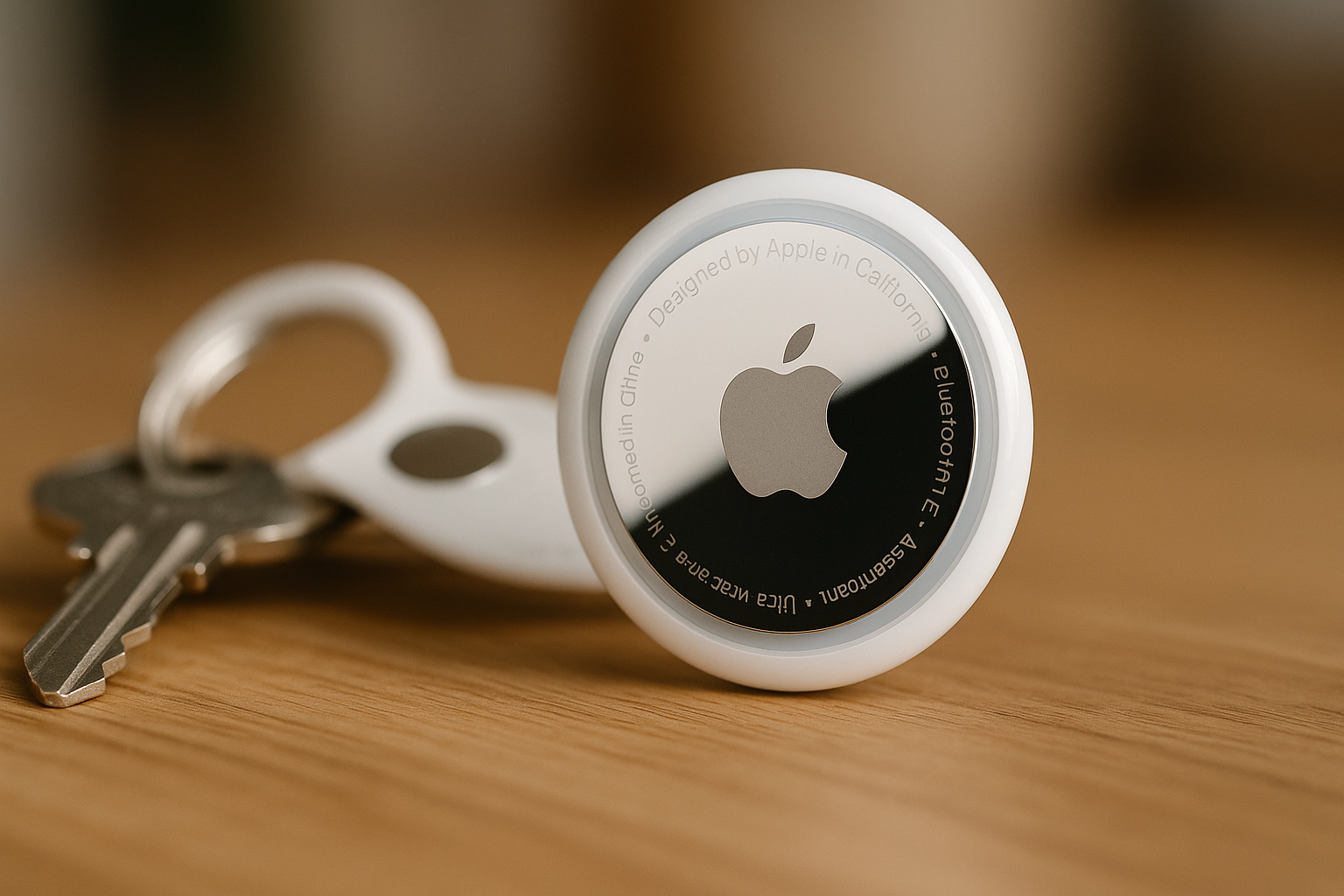
Apple Airtag’s design and build emphasise simplicity and functionality. It is a small, circular device with a minimalist aesthetic, characteristic of Apple’s design philosophy. The device measures 31.9mm in diameter and is 8mm thick. Weighing just 11 grams, it is lightweight yet durable, crafted to withstand everyday wear and tear.
The Airtag’s construction includes the following key components:
Casing:
- The outer casing is made from polished stainless steel, which provides a sleek, reflective surface.
- The casing is laser-etched with the Apple logo, enhancing its premium look.
- It is IP67-rated, ensuring water and dust resistance.
Battery:
- The Airtag is powered by a user-replaceable CR2032 coin cell battery.
- The battery life is estimated to last up to a year with standard usage.
- The battery compartment is easily accessible, allowing for straightforward replacement.
Speaker:
- The built-in speaker emits audible signals to help locate the Airtag.
- The speaker is integrated into the device’s structure without compromising compactness.
Internal Components:
- The Airtag houses a U1 chip, enabling precise location tracking using Ultra-Wideband technology.
- It includes a Bluetooth LE (Low Energy) module for connectivity with Apple devices.
Back Panel:
- The back panel is made from a white plastic material, aiding in signal transmission and NFC reader function.
- Users can personalise and engrave the back panel.
Apple Airtag’s design demonstrates careful consideration of user experience and durability. Each element, from the stainless-steel casing to the battery compartment, is optimised for practicality and aesthetics. This meticulous design ensures the Airtag not only performs well but also aligns with the high standards associated with Apple products.
How the Apple Airtag Works
The Apple Airtag operates through several technological innovations to help users keep track of their belongings. Here’s an in-depth look at the key components and functionalities:
Bluetooth Technology
The Airtag uses Low Energy Bluetooth (BLE) to communicate with nearby Apple devices in the Find My network. This allows the Airtag to send out signals that can be detected by iPhones, iPads, and Macs, enabling the user to locate their item.
Precision Finding
For more accurate location tracking, Airtags are also equipped with U1 chips that utilise Ultra-Wideband (UWB) technology. This feature aids in pinpointing the Airtag’s location more precisely, particularly useful when it is nearby.
- UWB Technology: Enhances precision location tracking.
- Accuracy: Provides directional feedback, pointing the user towards the item.
Find My Network
The Airtag leverages the extensive Find My network, which comprises hundreds of millions of Apple devices worldwide. When an AirTag is separated from its owner, nearby devices in the network anonymously and securely relay its location back to the owner.
- Anonymous Reporting: No identifiable information is shared.
- Encrypted Transmission: Ensures user privacy.
Lost Mode
If an item with an Airtag is lost, the user can activate Lost Mode. This feature ensures that:
- The owner’s contact information is shared if the Airtag is found.
- The Airtag can notify the user when its location is detected by another device in the Find My network.
NFC Tap for Found Items
Anyone who finds an Airtag can tap it using an NFC-capable device, such as iPhone or any NFC reader. Upon tapping, a web link appears that may contain the owner’s contact details, allowing the finder to get in touch.
Battery Life and Maintenance
The battery life of an Airtag is approximately one year, facilitated by a CR2032 coin cell battery. Replacing the battery is a straightforward process that involves:
- Twisting the back cover.
- Replacing the old battery.
- Securing the back cover again.
Sound Alerts
The incorporated speaker allows the Airtag to emit sound alerts to help locate items in close proximity when the user activates the alert through the Find My app.
Through these combined features, the Apple Airtag offers a robust and user-friendly solution for locating misplaced items. Employing state-of-the-art technologies ensures both precision and privacy in tracking personal belongings.
Setting Up Your Apple Airtag
To ensure optimal functionality and ease of use for your Apple Airtag, follow these systematic instructions:
Unboxing the Airtag
- Upon receiving the Apple Airtag, carefully unbox the package, ensuring all components—including the Airtag, a leaflet, and any additional setup aids—are intact and accounted for.
Activating the Airtag
- Remove the plastic tab to power the Airtag. This will activate the internal battery, making the Airtag ready for pairing.
Pairing with iPhone
- Bring the Airtag near your iPhone. A popup distinctly resembling AirPods pairing will appear on your screen.
- Tap on “Connect” in the popup.
Assigning an Item Name
- Choose a name for the Airtag, which could correspond to the item it will track, such as “Keys” or “Backpack”. Alternatively, create a custom name.
- Select the appropriate emoji if desired.
Registering the Airtag
- The Airtag will register with your Apple ID. This links the Airtag to your account, enhancing security and theft prevention.
Enabling Features and Permissions
- Grant necessary permissions, including location access. This allows Find My network to function seamlessly, providing precise location tracking.
- Activating Lost Mode will prompt any found Airtags to notify the owner through the Apple ID contact information.
Placing the Airtag
- Attach the Airtag to the intended item. Use accessories such as keyrings or adhesive mounts if needed, for secure attachment.
Configuring Through Find My App
Accessing Find My
- Open the Find My app on your iPhone.
- Navigate to the “Items” tab and select your newly added Airtag.
Customising Notifications
- Setup notifications for when your item is left behind or found, ensuring real-time updates.
Sharing
- Optionally share Airtag information with trusted contacts through the app’s sharing feature.
By following these detailed steps, individuals can efficiently set up their Apple Airtag, assuring its effectiveness in everyday use scenarios.
Using the Find My Network
The Apple AirTag’s integration with the Find My network is central to its functionality. Leveraging a vast network of Apple devices worldwide, users can pinpoint lost items with exceptional accuracy. Below are key aspects of utilising the Find My network:
How the Find My Network Works
When an AirTag is misplaced, it sends out a secure Bluetooth signal that can be detected by nearby devices in the Find My network. These devices relay the AirTag’s location back to its owner via iCloud, allowing the user to see the object’s location on a map.
Steps to Use Find My Network
- Open Find My App: The Find My app is pre-installed on all iOS devices. Users need to open the app to begin locating their AirTag.
- Navigate to the Items Tab: Within the app, the ‘Items’ tab lists all the registered AirTags associated with a user’s Apple ID.
- Select the Missing AirTag: Clicking on the misplaced AirTag displays its last known location on a map.
- Use Play Sound or Find Nearby: Users can either play a sound to locate an AirTag nearby or rely on Precision Finding (for iPhone 11 and later) to get detailed directions to the AirTag.
Privacy and Security
Apple ensures robust privacy in the Find My network:
- End-to-End Encryption: The communication between the AirTag and the Find My network is encrypted to prevent unauthorised access.
- Anonymity: Devices in the network don’t store data about the AirTag. They merely act as conduits, maintaining user privacy.
- Proactive Notifications: If an unknown AirTag is moving with a user, they receive a notification to ensure they aren’t being tracked without consent.
Lost Mode
Activating Lost Mode on an AirTag enables additional features:
- Notify When Found: Users will receive a notification when the location of the AirTag is detected by the network.
- Custom Message Display: A user can input a phone number or message that displays on the finder’s device, facilitating the return of the lost item.
Incorporating these features, the Apple AirTag and the Find My network offer a cohesive, secure solution for tracking and finding misplaced items efficiently.
Tracking Possessions with Precision
The Apple AirTag offers a sophisticated solution for item tracking, leveraging advanced technology and seamless integration with iOS devices. Through a multitude of features, Apple has crafted a device that ensures users can keep tabs on their belongings with remarkable accuracy.
Features and Technology
- Precision Finding: Utilising Ultra-Wideband (UWB) technology in conjunction with the U1 chip in iPhone models, Precision Finding provides visual, audible, and haptic feedback to guide users directly to their AirTag.
- Find My Network: The AirTag taps into Apple’s extensive Find My network, comprising millions of Apple devices. This network helps locate lost items even if they are not within Bluetooth range by anonymously relaying the device’s location to the owner.
- Bluetooth Connectivity: For proximity-based tracking, the AirTag employs low-energy Bluetooth, which conserves battery life while maintaining effective communication with paired devices.
Functionality
- Sound Alerts: AirTag features a built-in speaker that emits sound to help locate it in nearby locations. Users can trigger the sound through the Find My app.
- Privacy and Security: Apple has implemented robust privacy measures. Each interaction with the Find My network is anonymous and encrypted. Additionally, unwanted tracking notifications alert users if an unfamiliar AirTag is detected moving with them.
- Lost Mode: When an AirTag is set to Lost Mode, it can notify the owner when it is found. Users can also enter their contact information so anyone who finds the AirTag can reach out to them through a simple tap using NFC technology.
Integration and Use Cases
- Attaching to Items: The AirTag is designed to be attached easily to personal belongings such as keys, wallets, bags, and even bicycles. Its compact and lightweight design makes it versatile for various use cases.
- Customisation: Users can personalise their AirTags with custom engravings and choose from a range of accessories like key rings and loops to match their style and needs.
- Battery Life: AirTag boasts a user-replaceable CR2032 coin cell battery that lasts for approximately one year, ensuring long-term utility without frequent maintenance.
User Experience
Apple’s ecosystem facilitates seamless setup through a one-tap connection process. Once paired with an iPhone or iPad, the AirTag’s location is instantly visible in the Find My app. The intuitiveness of the app and the precision of the tracking technology combined make the AirTag an indispensable tool for everyday use.
Privacy and Security Features
Apple Airtag boasts an array of privacy and security features designed to protect users and their data. Below are the key components and functionalities:
Encrypted Communication
- End-to-End Encryption: AirTags use end-to-end encryption to ensure that communication between the Airtag and the Apple devices is secure. This means that only the intended devices can read the data being transmitted.
- Anonymous Device IDs: Unique identifiers are randomly rotated and change frequently. This ensures that data is anonymised and not easily traceable back to the user.
Anti-Stalking Measures
- Unwanted Tracking Alerts: Apple has implemented features to prevent stalking. If an AirTag that does not belong to the user is detected moving with them, the person will receive an alert on their Apple device.
- Audible Alerts: If an AirTag is separated from its owner and in motion for a prolonged period, it will emit a sound to alert those nearby of its presence.
Optimised Search Network
- Find My Network Security: Airtags are integrated into the ‘Find My’ network, leveraging the vast network of Apple devices to locate lost items accurately. Even in large public spaces, users’ personal data remains anonymous and intact.
- Limited Access to Location Data: Only the owner of the AirTag can see where it is located. This is made possible by incorporating a secure, private interface for users to track their devices.
Physical Tampering Protections
- Secure Device Firmware: The firmware within each AirTag is designed to resist tampering. Security updates are issued via the Find My network when necessary to combat new threats.
- Authenticated Location Reporting: Location updates sent by AirTags are verified using Apple’s authentication protocols, ensuring that only-approved devices can relay information about the AirTag’s whereabouts.
Compliance with International Regulations
- Data Protection Laws: Airtag is compliant with global privacy laws, such as GDPR in Europe. This compliance ensures that each Airtag offers protections aligned with rigorous privacy standards.
- Audits and Regular Assessments: Apple regularly conducts privacy and security audits on its products, including Airtag, to ensure ongoing adherence to best practices and legal frameworks.
User Customisation
Control Over Notifications: Users can manage and customise alerts and notifications related to AirTags through their device settings. This gives individuals control over how they receive information related to their accessories.
Privacy Options: Users can choose to disable Find My network for their AirTags entirely if desired, preventing their devices from participating in the broader network while still retaining fundamental tracking functionalities.
Real-Life Use Cases and Scenarios
The Apple AirTag offers numerous applications across different facets of daily life. Here are some valuable use cases and scenarios that demonstrate its versatility and functionality:
Locating Personal Items
Keys: Attaching an AirTag to a keyring can save time spent searching for misplaced keys. The tag can be tracked via the Find My app, providing real-time location updates.
Wallets: Tucking an AirTag into a wallet ensures it can be located if lost or misplaced. The compact design fits easily into most wallet types.
Bags and Purses: Dropping an AirTag into a bag or purse can prevent the inconvenience of losing such items. The device’s ping function can audibly alert users to its location.
Travel Convenience
Luggage Tracking: Placing an AirTag inside luggage can help travellers manage checked bags more effectively, reducing the stress associated with lost baggage.
Camera Equipment: Photographers can affix AirTags to camera bags, ensuring valuable gear is easily traceable during transit or on location.
Pet Management
AirTags can be used as supplementary locator devices for pets. Attaching one to a pet’s collar provides a backup method to track them should they stray or get lost.
Vehicle Tracking
Attaching AirTags to different parts of a vehicle can assist in locating the vehicle in crowded parking lots or if it gets stolen. Though not a replacement for traditional GPS trackers, it can provide supplementary security.
Assisting Loved Ones
AirTags can be attached to the belongings of elderly family members or individuals with health conditions that affect memory. This ensures their important items remain locatable, adding a layer of security for caregivers.
Employee Equipment Allocation
Businesses can benefit by attaching AirTags to valuable office equipment, such as laptops and projectors. This helps monitor item location and manage inventory more efficiently.
Child Safety
AirTags can be placed in children’s belongings, such as backpacks or jackets, providing peace of mind to parents by enabling the tracking of these items, especially in crowded places or during trips.
Recreational Use
For activities such as skiing, hiking, or biking, athletes can attach AirTags to their gear. This assists in recovering lost equipment and provides location data useful in emergency situations.
Shared Item Management
Household items that are often shared, such as remote controls or game controllers, can have AirTags attached. This facilitates quick and easy location, reducing the hassle of tracking such items.
Battery Life and Maintenance
Apple’s AirTag is equipped with a user-replaceable CR2032 coin cell battery, which provides convenience and a prolonged operational life.
Battery Life
- Longevity: The AirTag’s battery is designed to last approximately one year under normal usage conditions. This is a significant benefit for users who seek long-term tracking without frequent battery changes.
- Notifications: Apple has incorporated an intelligent notification system. When the battery is running low, users receive an alert on their connected iOS device, prompting them to replace the battery.
Replacing the Battery
- Opening the AirTag: Gently press down and twist the stainless steel back plate counterclockwise.
- Removing the Old Battery: Take out the depleted CR2032 battery.
- Inserting a New Battery: Place a new CR2032 battery with the positive side facing up. Ensure the new battery is correctly seated within the compartment.
- Securing the Back Plate: Align the back plate with the AirTag and twist it clockwise until it clicks securely into place.
Maintenance Tips
- Avoiding Extreme Temperatures: Exposure to extreme temperatures can impact battery performance. It’s advisable to keep the AirTag within the temperature range of -20°C to 60°C.
- Periodic Checks: Routine checks of the AirTag and the accompanying notifications on the connected iOS device contribute to proactive maintenance.
- Handling: While the AirTag is durable, it’s best to handle it with care to maintain its integrity and ensure longevity.
Environmental Considerations
- Battery Disposal: Dispose of the used CR2032 battery in accordance with local environmental regulations. Proper disposal ensures environmental safety and compliance with legal standards.
- Sustainability: By offering a user-replaceable battery, Apple has emphasised sustainability, reducing the need for complete device replacement and minimising electronic waste.
Summary
Regular battery maintenance ensures the longevity and consistent performance of the AirTag. Users benefit from a straightforward battery replacement process and helpful notifications, allowing them to utilise the device efficiently and responsibly.
Accessories and Customisation Options
The Apple AirTag comes with a variety of accessories and customisation options to cater to individual preferences and needs. These accessories enhance both the functionality and aesthetics of the AirTag, providing users with a range of ways to personalise their device.
Accessories
- Key Rings: Available in a plethora of designs, key rings allow users to attach the AirTag to their keys, bags, or other valuable items. Materials range from premium leather to durable silicone.
- Loops: For those who want a more versatile attachment method, loops are a popular option. Similar to key rings, loops come in various materials and colours, ensuring a secure attachment to bags or luggage.
- Mounts: Specialised mounts are available for attaching AirTags to bicycles, pets’ collars, and even remote controls. These mounts are typically made with robust materials to ensure the AirTag remains securely fastened.
- Protective Cases: To guard against potential damage, users can opt for protective cases. These cases come in various designs and offer additional cushioning to shield the AirTag from scratches and impacts.
Customisation Options
- Initials and Emojis: Apple offers free engraving services where customers can add initials, names, or even emojis to their AirTags. This personalisation not only adds a unique touch but also aids in identifying the AirTag.
- Colours: While the AirTag itself is typically white, the accessories come in a wide spectrum of colours, allowing users to mix and match according to their style preferences. Popular accessory brands provide colour-coordinated sets to maintain a cohesive look.
- Collaborations: Apple collaborates with renowned brands to offer exclusive designs. These limited-edition accessories often feature unique patterns, textures, and materials, providing an opportunity for users to own a stylish and distinctive AirTag.
- Third-Party Accessories: Various third-party manufacturers design accessories for the AirTag. These often include unique features or designs not available from Apple. From wallet holders to adhesive mounts, the options are extensive and cater to specific user needs.
By combining accessories and customisation options, users can ensure their AirTag is not only functional but also an expression of personal style.
Comparing Apple Airtag with Competitors
The Apple Airtag is often compared with other Bluetooth trackers like Tile and Samsung SmartTag. Each of these devices offers unique features and varying levels of integration with different ecosystems.
Design and Build Quality
- Airtag: Compact, white disc with a stainless steel back, scratch-resistant, and water-resistant (IP67).
- Tile: Available in various shapes (e.g., Mate, Pro), made from durable plastic, and the Tile Pro is water-resistant (IP55).
- SmartTag: Square-shaped with rounded edges, made from plastic, slightly larger and heavier than Airtag, and also water-resistant (IP53).
Connectivity
- Airtag: Utilises Apple’s extensive “Find My” network, leveraging the vast number of Apple devices for location tracking.
- Tile: Depends on its network of users, which is substantial but smaller in comparison to Apple’s ecosystem.
- SmartTag: Works primarily within Samsung’s Galaxy ecosystem, using Galaxy devices for location tracking.
Precision Finding
- Airtag: Uses Ultra-Wideband (UWB) for precise, directional location tracking, available to users with iPhone 11 or newer.
- Tile: Relies on Bluetooth for proximity tracking, with no UWB support.
- SmartTag: The original version utilises Bluetooth, while the SmartTag+ model includes UWB.
Battery Life
- Airtag: User-replaceable CR2032 cell battery, lasting approximately one year.
- Tile: Various models with different battery lives, ranging from non-replaceable (1 year) to replaceable (1 year or more).
- SmartTag: User-replaceable CR2032 cell battery, also lasting about one year.
Software and User Interface
- Airtag: Integrated seamlessly with Apple’s “Find My” app, offering an intuitive and cohesive user experience.
- Tile: Utilises the Tile app, available on both iOS and Android, straightforward but less integrated than Apple’s solution.
- SmartTag: Uses the SmartThings app, best suited for Samsung Galaxy users, providing moderate integration and user experience.
Price Point
- Airtag: Priced mid-range, reflecting its premium build and advanced features.
- Tile: Pricing varies greatly across different models, ranging from budget-friendly to premium.
- SmartTag: Generally priced similarly to Airtag, with SmartTag+ being slightly more expensive due to UWB.
Apple Airtag shines in its seamless integration with the Apple ecosystem, advanced precision finding, and robust build quality. Competitors offer varying advantages like broader platform compatibility or diverse product ranges, catering to different user needs and preferences.
Pros and Cons of the Apple Airtag
Pros
- Precision Finding - The Apple Airtag uses the U1 chip and Ultra-Wideband technology, allowing for precise locating of lost items.
- Seamless Integration with Apple Ecosystem - Airtags integrate smoothly with the Find My app and all Apple devices, ensuring a consistent user experience.
- Accurate Location Tracking - Utilises a vast network of Apple devices for accurate location tracking.
- Privacy and Security Features - Built with advanced privacy features, including encrypted location data and anti-stalking measures.
- Replaceable Battery - Features a user-replaceable CR2032 battery, offering up to a year’s worth of use before needing replacement.
- Elegant Design - Compact and sleek design that can attach to various items without adding bulk.
- Lost Mode - Activating Lost Mode enables notifications and alerts when an Airtag is detected by other devices, aiding in recovery.
- Durability - AirTags are water and dust-resistant, enhancing their durability in various environments.
- Accessibility Features - Includes options like voice-over and larger text for users with visual impairments.
Cons
- Limited to Apple Ecosystem - Functionality is mostly limited to Apple devices, making it less useful for non-Apple users.
- No Built-in Attachment Mechanism - Requires a separate accessory for attachment, incurring additional costs.
- Privacy Concerns - Despite security measures, there are concerns about potential misuse for tracking individuals.
- Expense - While the Airtag is competitively priced, additional accessories and reliance on Apple products may add to the cost.
- Interference in Dense Areas - Performance may degrade in densely populated areas due to potential signal interference.
- Limited Non-Contact Alerts - Requires the owner to come within a certain range for locating, which can be a limiting factor in some situations.
- Delayed Third-Party Access - Limited APIs for third-party developers restrict broad use cases beyond Apple’s intentions.
- Dependency on Recent iOS Versions - Functionality may require the latest iOS updates, alienating users with older devices.
- Non-replaceable Internal Components - Apart from the battery, other internal components are not user-replaceable, limiting long-term usability.
Tips and Tricks for Maximising Utility
To utilise the Apple Airtag to its fullest potential, it’s essential to adopt strategic best practices. Here are several tips and tricks to help you maximise utility.
Customising Notifications
Custom notifications can aid in monitoring and tracking.
- Configure Proximity Alerts: Use the Find My app to set notifications when you leave an Airtag behind. Navigate to Devices, select the Airtag, and enable “Notify When Left Behind.”
- Custom Sounds: Add a unique sound for the Airtag via Settings. This helps in quick identification, especially when multiple Airtags are in use.
Placement
Strategically placing Airtags can enhance effectiveness.
- Inside Luggage: Position the Airtag in an interior pocket to prevent easy removal by third parties.
- On Keys: Attach the Airtag using a slim keyring. Ensure it does not dangle to avoid unnecessary noise.
- In Vehicles: Hide the Airtag within the car, preferably around the seat or beneath a floor mat. This makes tracing easier in case of theft.
Utilising Lost and Found Features
In case an item gets lost, the Airtag offers reliable recovery options.
- Lost Mode Activation: Activate Lost Mode from the Find My app. This allows anyone with an NFC-capable device to tap the Airtag and retrieve your contact details.
- Message Customisation: Personalise the contact message in Lost Mode to ensure prompt returns. Use concise language like “My keys are lost. Please call me at [Your Number].”
Security Enhancements
Consider implementing additional security measures for added peace of mind.
- Enable Pairing Lock: Pairing Lock adds a layer of security. It ensures that an Airtag cannot be paired with another iCloud account without the original owner’s consent.
- Verify and Update Firmware: Regularly check firmware updates via the Find My app to enhance security and add new features.
Prolonging Battery Life
Optimising battery longevity ensures uninterrupted functionality.
- Disable Unnecessary Features: Manually turning off unnecessary alerts can preserve the battery life.
- Battery Replacement: Regularly monitor battery status within the Find My app. Replace the CR2032 battery promptly when notified of low battery levels.
Optimising Use in Daily Routines
Integrating Airtags into daily activities makes tracking seamless.
- Routine Items: Attach Airtags to items used frequently like laptops, gym bags, or backpacks.
- Shared Items: For shared objects within households or offices, ensure all users have access permissions in the Find My network to prevent conflicts.
Adopting these tips and tricks will significantly enhance the overall utility of the Apple Airtag, ensuring optimal performance and reliability across various use cases.
Future Updates and Improvements
Apple continually works to enhance its products, and the AirTag is no exception. Here are some expected future updates and improvements that could further refine its capabilities and user experience:
Enhanced Precision Finding
Apple may introduce updates to improve Precision Finding accuracy. This would allow users to locate their items even more precisely, reducing the time and effort required to find lost belongings.Expanded Compatibility
Future updates could expand compatibility with a wider range of devices, including non-Apple products. This move could broaden the AirTag’s user base and integrate it more seamlessly into various ecosystems.Battery Life Optimisation
An enhanced battery management system could be implemented to extend the operational lifespan of the AirTag. Increased efficiency in power consumption could lead to less frequent battery replacements.Improved Security Features
Apple is known for prioritising user privacy and security. Prospective updates might include additional anti-stalking measures and advanced encryption protocols to protect user information and ensure the device is used safely.New Form Factors
The introduction of alternative AirTag designs could cater to specific use cases. Smaller, larger, or more durable versions could target varying consumer needs and expand the utility of the product.Augmented Reality Integration
Incorporating augmented reality (AR) could revolutionise how users locate their items. Enhancing the ARKit used in the Find My app could provide a more interactive and visual method for locating tagged items.Enhanced Integration with Other Apple Services
Future updates could see deeper integration with Apple services like Siri, HomeKit, or the Apple Watch. This would amplify the AirTag’s functionality across various platforms, enabling a more cohesive user experience.Additional Accessory Support
Apple might release more accessories to complement the AirTag. Enhanced support for third-party accessories could open up various customisation options.
It is important to note that while these potential updates and improvements are speculative, Apple’s commitment to innovation suggests that users can expect continual enhancements that will keep the AirTag at the forefront of tracking technology.
Conclusion and Final Thoughts
Apple’s AirTag has revolutionised the way individuals keep track of their belongings. Designed to seamlessly integrate with the Apple ecosystem, the device provides an effective solution to locating lost items. Its sleek design, easy setup, and user-friendly interface make it an attractive option for a wide range of users.
Key Features
- Precision Finding: Utilises Ultra-Wideband technology for pinpoint accuracy.
- Seamless Integration: Compatible with the Find My app, allowing for easy tracking within Apple’s ecosystem.
- Long Battery Life: CR2032 battery offers long-lasting power, often up to a year.
- Privacy and Security: Features like encrypted communication and alerts for unauthorised tracking ensure user safety.
Use Cases
- Daily Essentials: Attach to frequently misplaced items like keys, bags, or wallets.
- Travel: Useful for keeping track of luggage and important travel items.
- Pets: Attach to a pet’s collar to ensure they are always locatable.
- Situational Uses: Useful for elderly family members or children to provide peace of mind.
Setup and Usage
Setting up an AirTag is straightforward:
- Opening the Box: Remove the plastic tab to activate the AirTag.
- Pairing: Hold near an iPhone or iPad and follow on-screen instructions.
- Naming: Assign a name for organisational purposes.
Advantages
- Ease of Use: No complex setup processes or advanced tech knowledge required.
- Durability: Water and dust resistant, suitable for diverse environments.
- Network: Utilises the vast network of Apple devices to locate lost items.
Limitations
- Compatibility: Limited to Apple devices, excluding Android users.
- Data Dependency: Functions best when connected to the internet or within a network of Apple devices.
Final Considerations
For Apple users, the AirTag offers unparalleled convenience and peace of mind. Its integration, advanced features, and proven reliability make it a valuable addition to the daily routine. The device embodies Apple’s commitment to user-friendly and innovative technology, providing a practical solution for modern living.